01. Overview
Game Theory is a sports technology company offering facilities for booking
venues and coaching across 12+ sports at 35+ locations. What sets them apart is their
AI-powered computer vision (CV) technology, providing real-time game insights
like scoring, rallies in badminton, power shots, and other performance metrics. This data helps
both coaches and students improve their game effectively.
02. Problem
"Coaches at Game
Theory struggle with manual scheduling, last-minute changes, and limited access to class and
student details. Supervisors also face challenges tracking attendance and relying on inefficient
spreadsheets, leading to miscommunication and workflow disruptions."
Coaches at Game Theory receive their weekly schedules manually from supervisors, often facing
last-minute changes or cancellations via phone calls with no prior notice. This lack of a
structured system makes it difficult for coaches to access class details and student information
efficiently. Additionally, supervisors and stakeholders struggle with tracking coach attendance
and check-in times, relying on spreadsheets that are inefficient and time-consuming, leading to
workflow disruptions.
Manual Rostering
Schedules are assigned
manually, making the process slow and prone to errors.
Unorganized Schedule Updates
Changes and cancellations are communicated via
calls, causing confusion.
Lack of Class Details
Coaches have limited visibility into class
structures, lesson plans, and student progress.
Difficulty Accessing Student Information
No centralized system for storing
and retrieving student data.
Attendance Tracking Issues
Supervisors struggle to monitor coach check-ins
and participation.
03. Research & Competetive Study
I first discussed key challenges with the stakeholders and the supervisor, who
regularly communicates with coaches about scheduling and class issues. I initially approached
these discussions with a specific set of questions, focusing on the problems coaches face.
However, I ended up uncovering additional challenges that I hadn’t anticipated.

Key Challenges Identified from Stakeholder and
Supervisor Discussions.
First, the supervisor is responsible for maintaining coaches'
attendance records, which is currently done manually using Excel sheets. This
process is tedious and prone to errors. As a result, attendance is sometimes missed, or coaches
fail to communicate their attendance properly to the supervisor.
Secondly, manually creating and managing schedules every week
is both time-consuming and complicated. Once the schedules are made, distributing them to the
coaches takes additional effort, making the process even more challenging. On top of that, if
there are any updates or changes, it becomes even harder to notify and
communicate them to the coaches in a timely and efficient manner.
Thirdly, the supervisor also needs to track how well the coaches are
performing and gather feedback from students about their coaching. More
importantly, this feedback needs to be shared with the coaches in a structured
way, helping them understand their strengths and areas for improvement.
Next, I conducted interviews with coaches at two Game Theory centers where
many students are enrolled. Talking to them gave me some valuable insights. Here are the
responses from one of the coaches I spoke with.
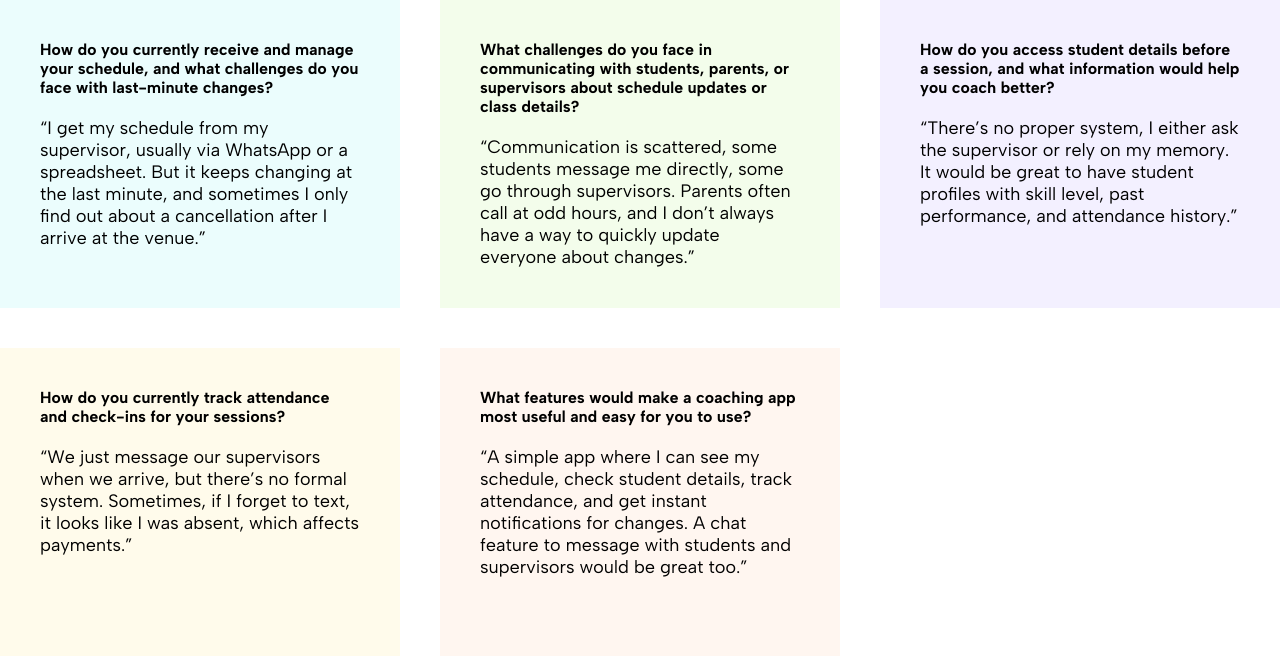
Responses from a Coach at a Game Theory
Venue.
I also explored the trainer app of one of our indirect competitors to analyze what they are
doing well and identify areas where we can improve and incorporate features into our own
app. The goal was to enhance our app without reinventing the wheel.
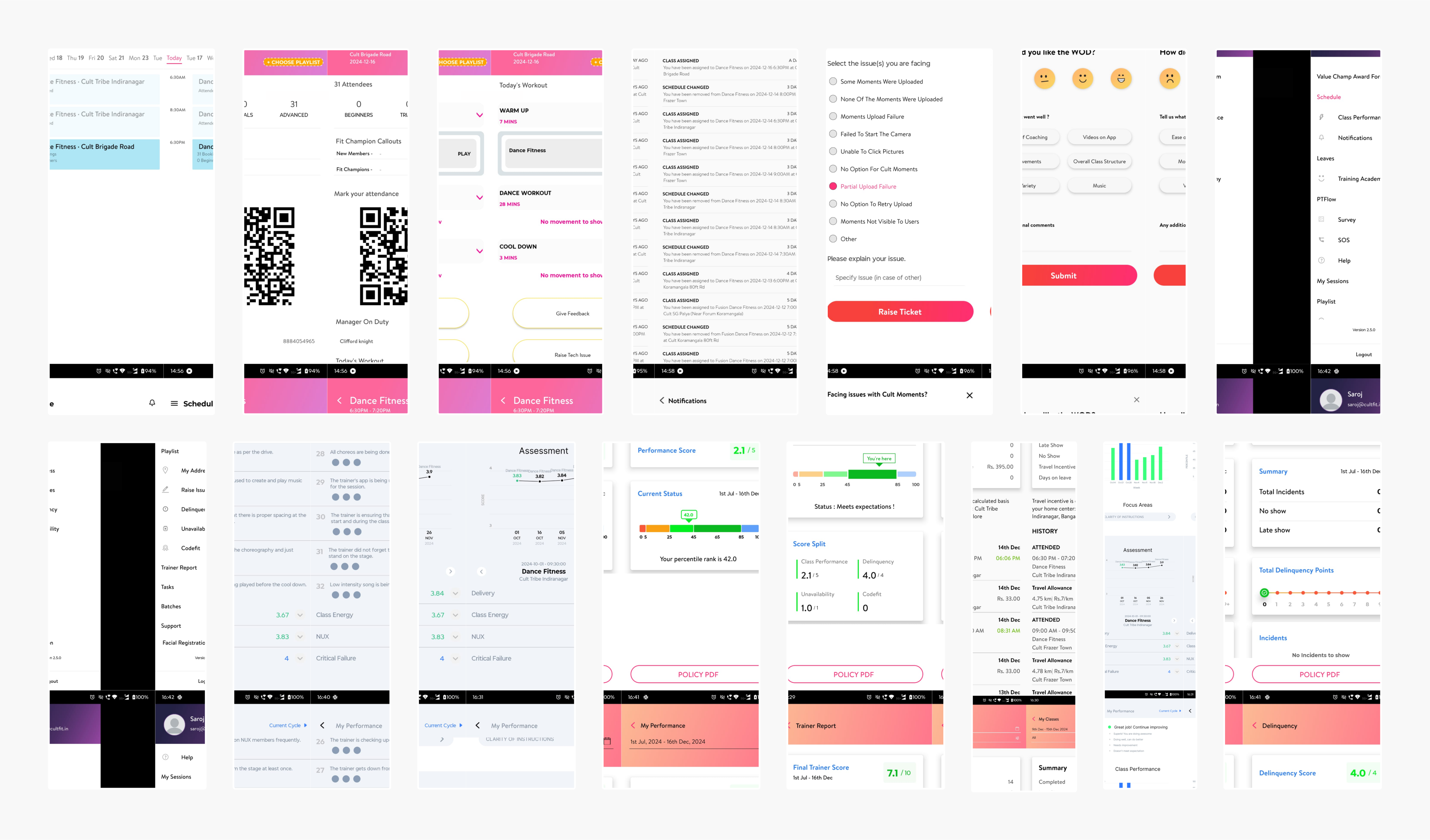
Screen Flows from Our Indirect Competitor's
Trainer App.
One thing they did really well is the layout of the schedule screen. It's easy to view the
class schedule at a glance, with clear and easily understandable information.
However, there are a few areas that need improvement. The way ratings and feedback are
presented is a bit confusing, with too much information at once, which can be overwhelming
for coaches. Additionally, the class details lack important information about attendees,
their skill levels, and previous classes attended. This is crucial for coaches to prepare
lessons accordingly and for supervisors to categorize students based on their levels.
04. Solution, User Flows & Lo-Fi Wireframe
"The goal is to
simplify scheduling and ensure coaches get instant notifications if a class is modified or
canceled. Coaches will have all the details they need about their classes and students, helping
them prepare better.
Supervisors will also get automated updates on attendance and ratings,
reducing manual work. Plus, coach ratings will be clearly displayed in their app, making it
easier to track progress and improvements."
I began by mapping out the user flows for three key areas. First, the flow for
viewing schedules, ensuring coaches can easily see their upcoming classes.
Second, the flow for viewing ratings, making it simple for coaches to track
their performance. Lastly, the flow for receiving notifications about class
changes or modifications, so they stay updated in real time.

Schedule Flow
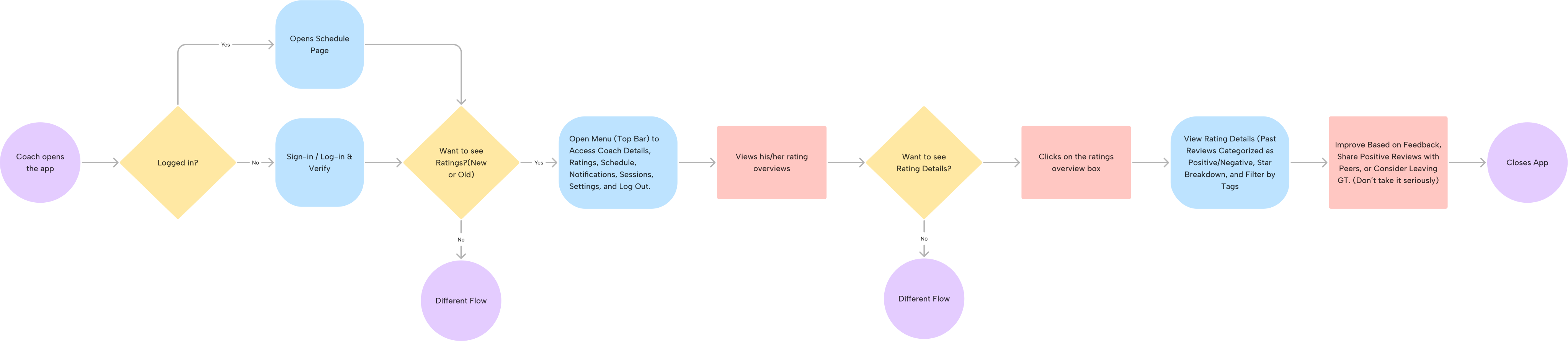
Ratings Flow
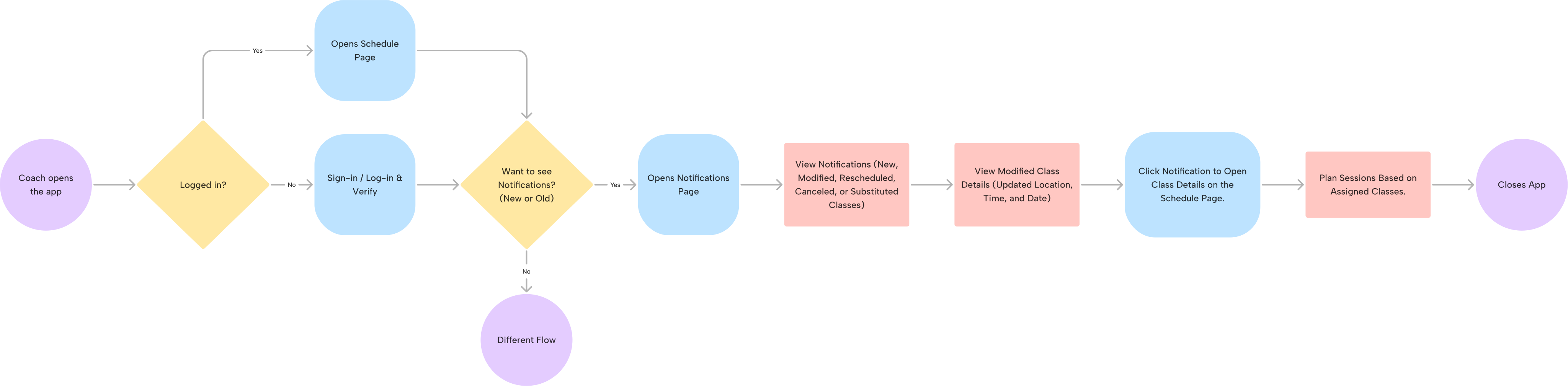
Notifications Flow
Following the user flows, I structured the information architecture and visual
hierarchy, making it easier to design the low-fidelity version of
the coach app. During this phase, I further refined the information architecture to ensure a
more intuitive and seamless user experience.
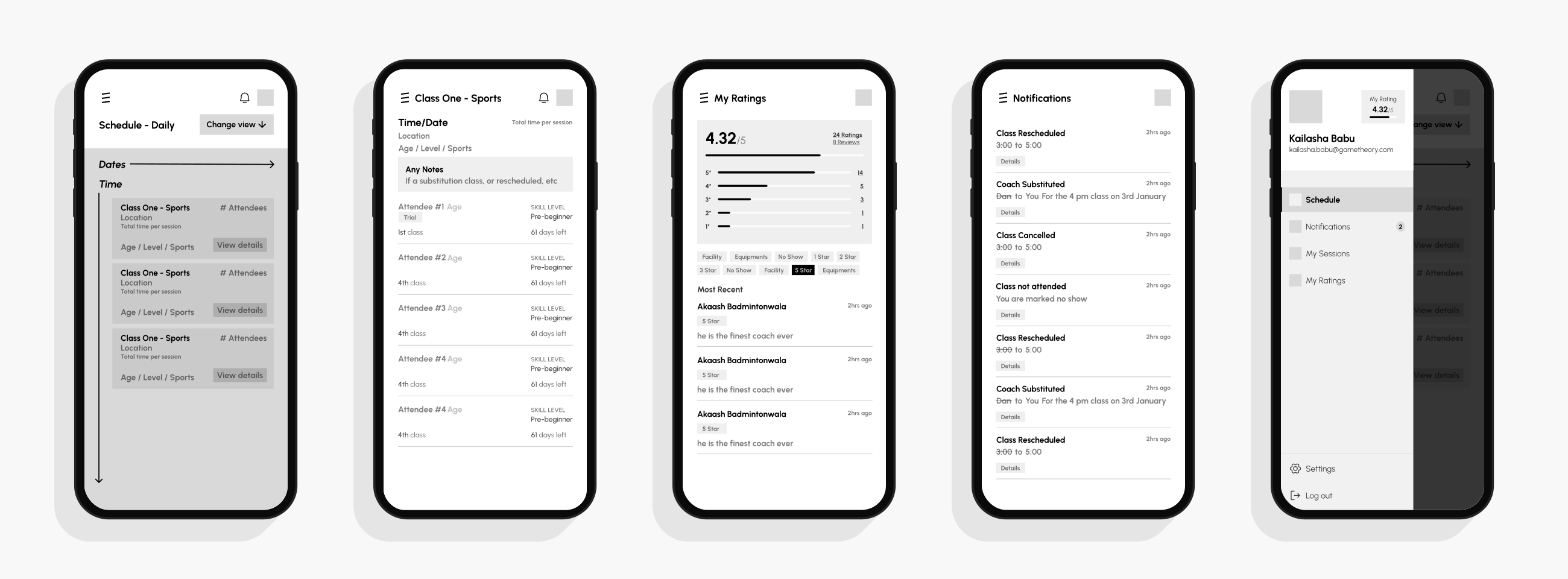
Low-Fidelity Version of the Coach App.
I tested the lo-fi version of the coach app with users and found a few things that didn’t quite
work. Here’s what I learned:
01. Showing Student Names in Feedback Could Be a Problem
Originally, I
displayed student names next to their feedback for coaches. But this could make things unfair.
If a coach sees a negative review, they might feel pressured to ask the student to change it. If
the review is positive, the coach might start giving that student special attention. To keep
things fair, it’s better to keep feedback anonymous.
02. Extra Schedule Views Aren’t Needed
On one of the class details page
(second screen), I included the number of days left in a student’s coaching subscription. But
after testing, I realized this information doesn’t really help coaches with their daily work. It
just takes up space without adding value.
03. Some Information Isn’t Useful
I included options for coaches to switch
between daily, weekly, and monthly schedule views. But during testing, I realized most coaches
only need to see their daily schedule. The extra views just add unnecessary complexity, so
keeping it simple with a daily view is more useful.
These small but important insights will help make the app easier and more useful for coaches.
05. Hi-Fi Prototype and Designs
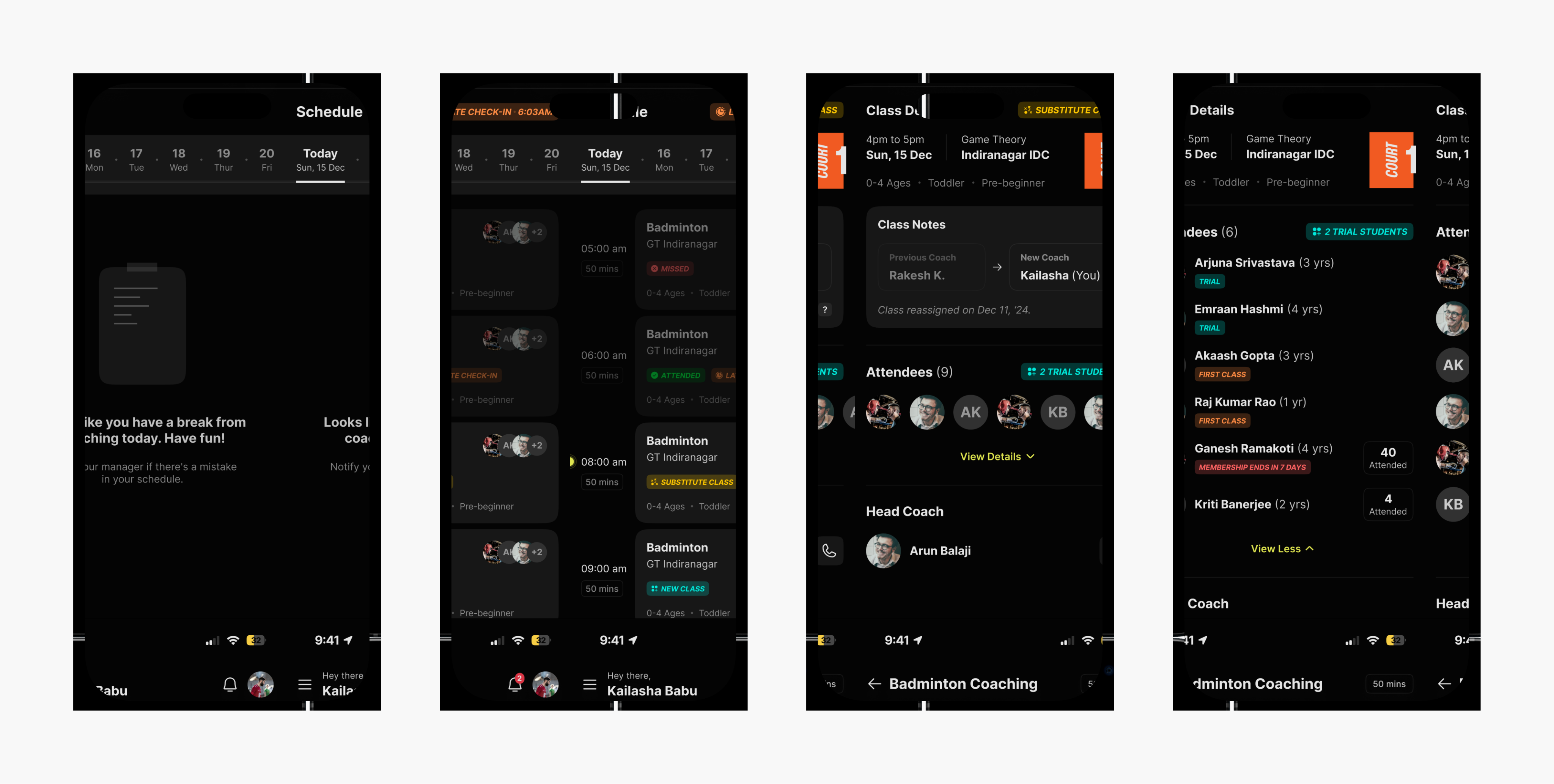
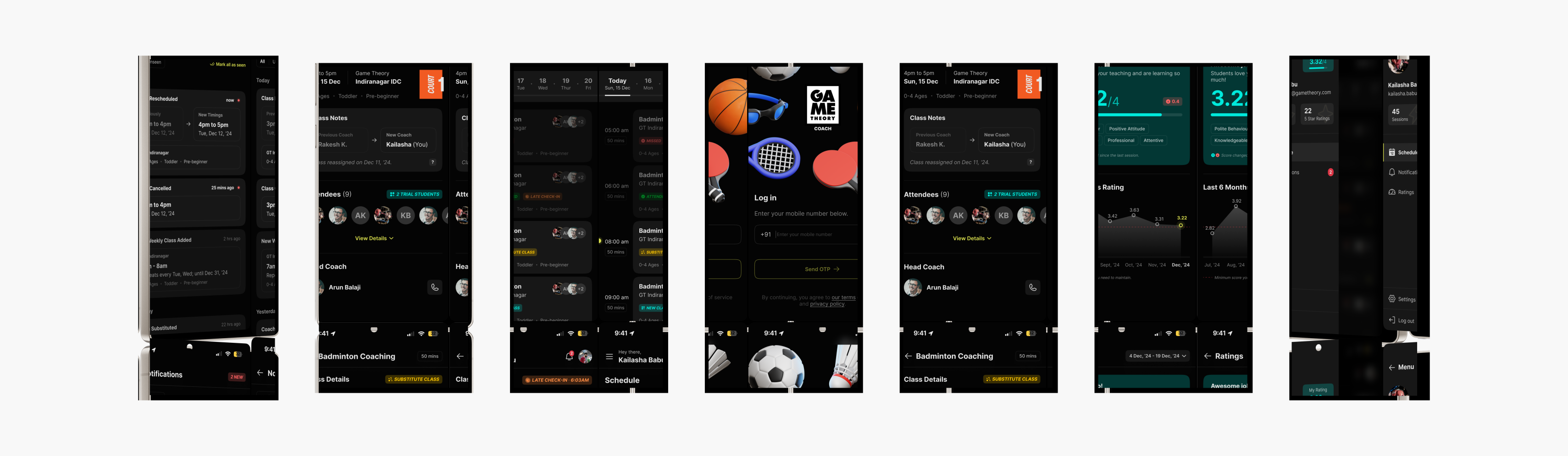
Screen 1: Empty State of Schedule Page. Screen 2: Populated Schedule Page.
Screen 3: Class Details Page (Collapsed). Screen 4: Class Details Page (Expanded).
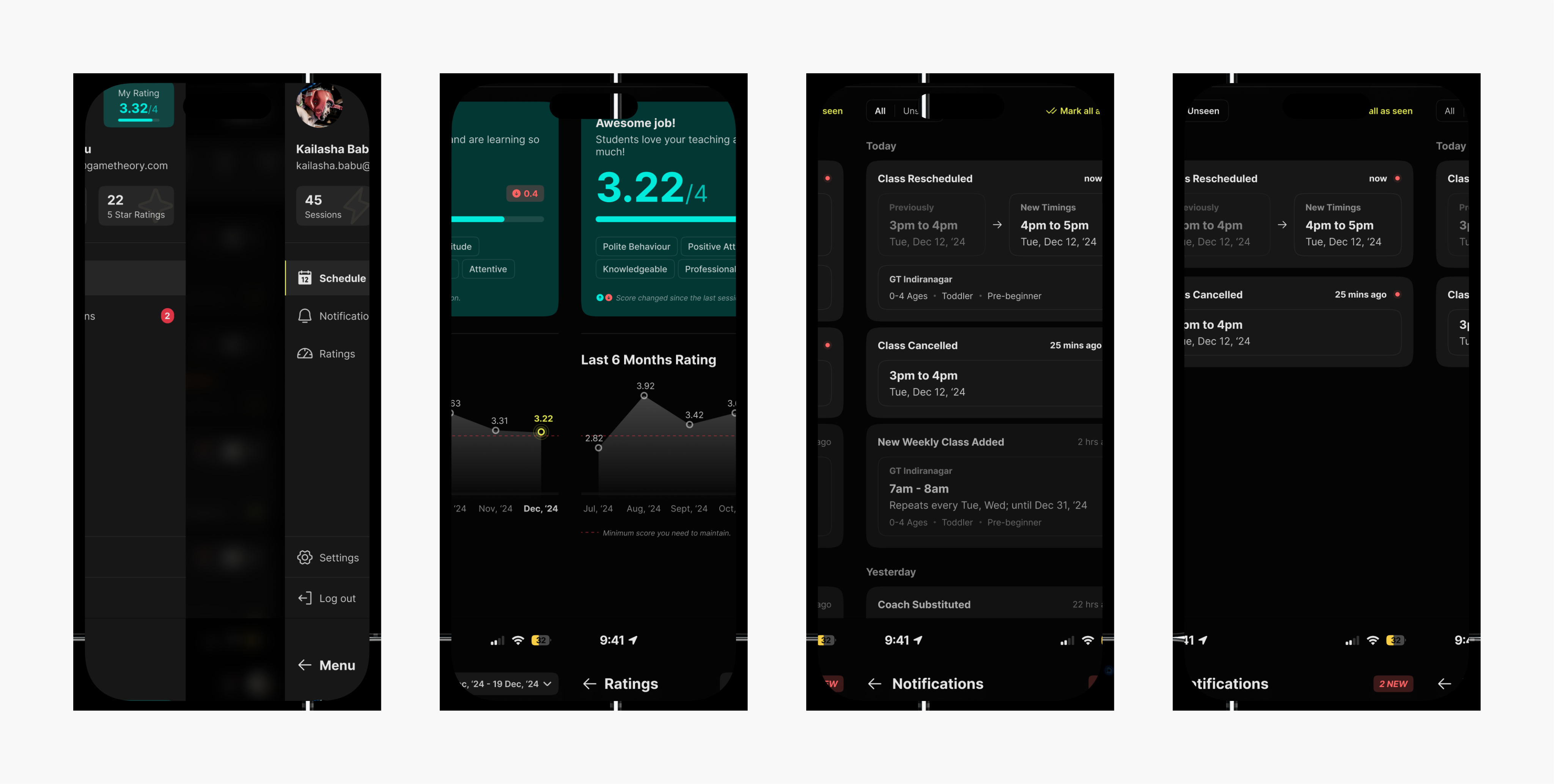
Screen 1: Sidebar Navigation Menu. Screen 2: Coach Ratings & Feedback Page.
Screen 3: Notification Page (All Notifications). Screen 4: Notification Page (Unseen Notifications).
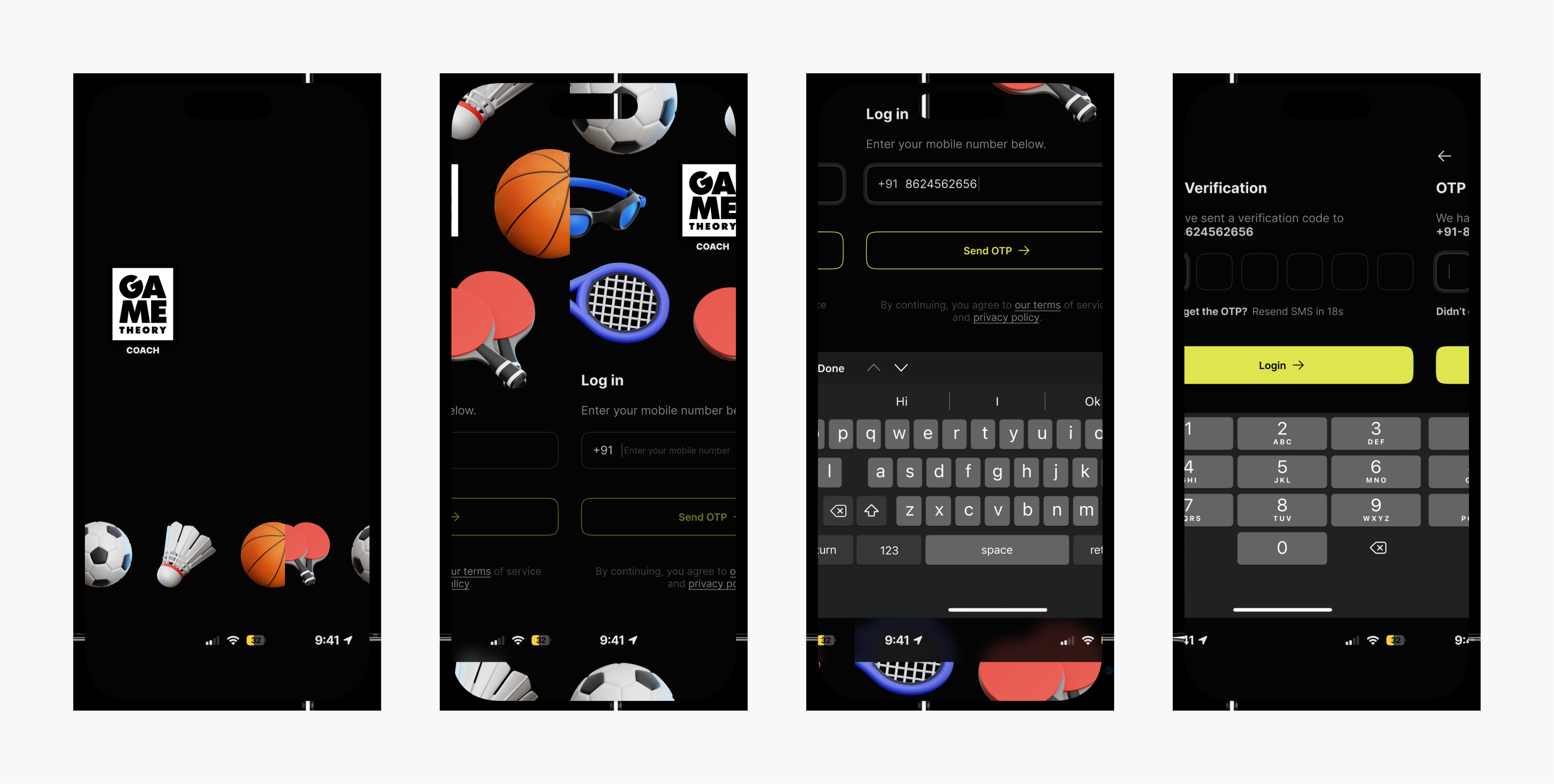
Screen 1: Splash Screen, App Loading Screen. Screen 2: Sign-in Page (Default).
Screen 3: Sign-in Page (Active). Screen 4: OTP Verfication Page.
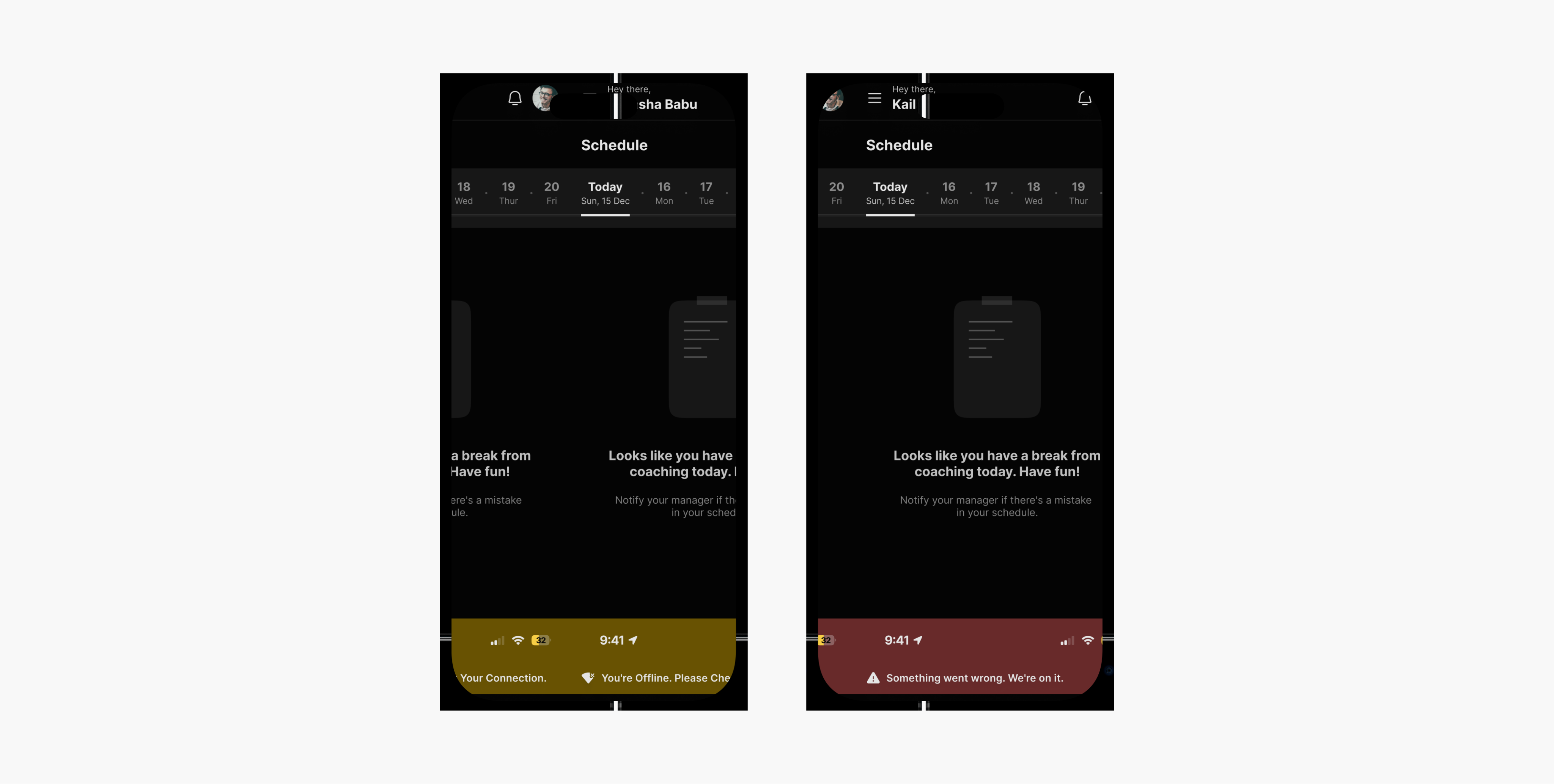
Screen 1: No Internet Connection Error Message (Edge Case). Screen 2: Something Went Wrong Error Message (Edge Case).
06. Future Enhancements for the Coach App
1. Coach Feedback for Students
In the future, we can add a feature that allows coaches to give feedback or reviews to students directly through the app. This will help students track their progress and understand areas where they need to improve more easily.
2. More Features for Coaches
We plan to introduce additional features for coaches, such as the ability to apply for leave or request a half-day off directly from the app. Another upcoming addition is a delinquency rating system, which will track attendance and reviews to ensure accountability & reliability.
3. In-App Attendance System
To make attendance tracking smoother, we could introduce an in-app check-in system. As soon as a coach arrives at the location, a Check-In button would pop up, allowing them to mark their attendance easily. This would make the process more seamless.